When the work happened
Time of arrival and departure, with sub-minute precision. Stamped from the device clock at the moment the operation opens and closes — not entered freehand afterwards.
Snow plowing documentation
Wintertrace captures the elements a reviewer of snow plowing operations typically asks about — time, location, weather, what was applied, who was on the truck — automatically and at the moment they occur. The result is a structured PDF service proof per operation, tied to a locked database row that records every change.
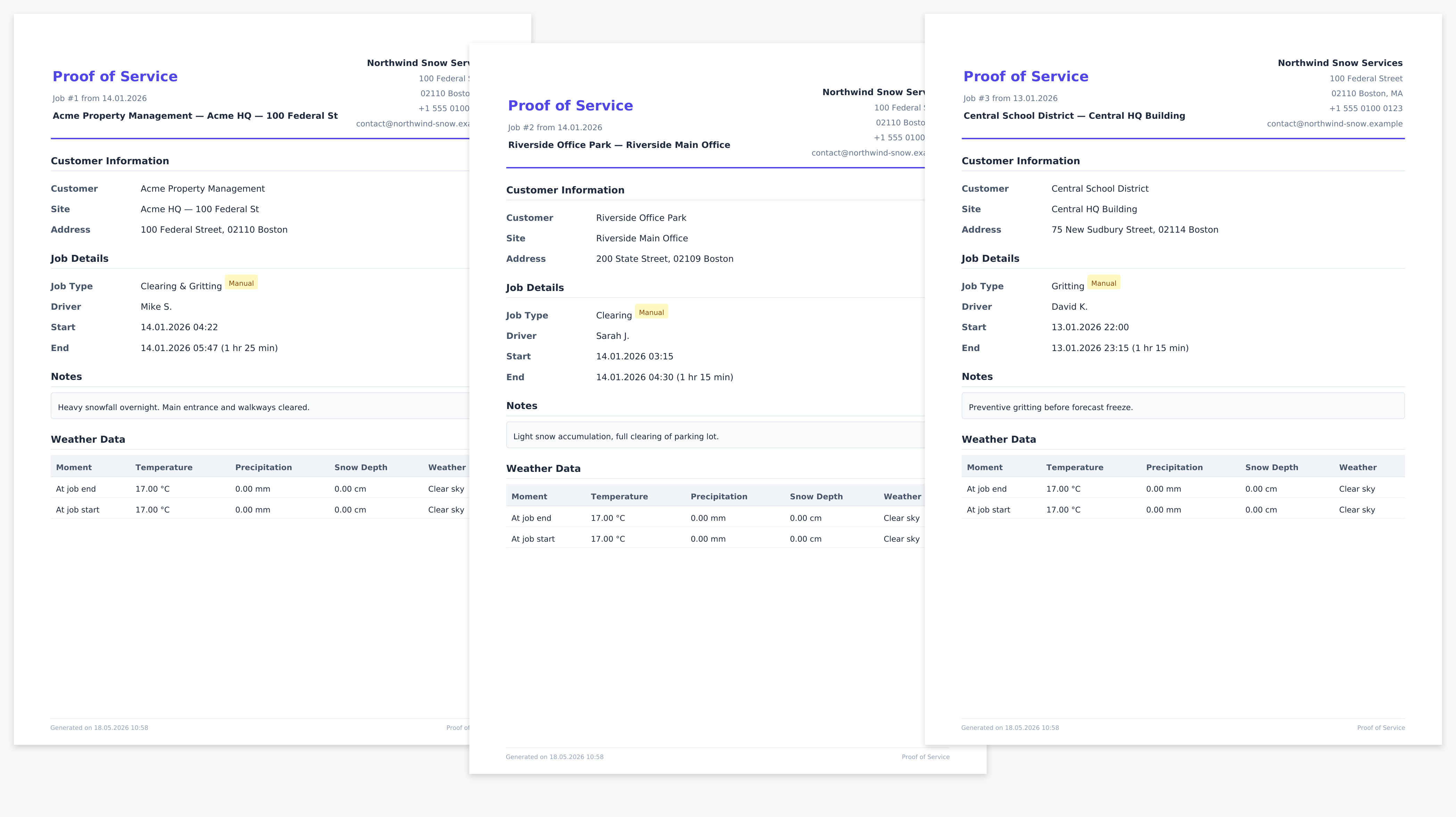
Snow plowing has a structural problem the contractor did not create. The job happens at four in the morning, often in poor visibility, often with nobody at the property who is awake to notice. Hours later, somebody slips. The conversation that follows is not about whether plowing happened in general — it is about whether plowing happened at this site, at this time, under conditions that called for it.
A printed route plan is a statement of intent. A handwritten log is somebody's memory turned into ink. A text message after the fact is a reconstruction. Each can be argued with. What is harder to argue with is data that was captured at the time, by a device that was on the truck, and held in a record that has not been edited since.
The elements that recur across insurer questionnaires, property management contracts, and the guidance published by professional associations. No single jurisdiction mandates every item; cumulative coverage is what tends to matter.
Time of arrival and departure, with sub-minute precision. Stamped from the device clock at the moment the operation opens and closes — not entered freehand afterwards.
Coverage of the property, ideally as a recorded GPS track rather than a route plan. A plan describes intent; a track describes what occurred.
Temperature, precipitation, snow depth around the time of operation, ideally from a source independent of the operator.
Salt, brine, mechanical clearing, sanding, or a combination. The structured field is more useful than a freehand note that says "did the usual".
The individual operator, the shift they belonged to, the equipment used where relevant.
Whether the record was made at the time, whether it has been edited since, and what audit trail the system carries.
The driver does almost nothing different. The documentation assembles itself.
Driver opens the operation
Tap on the customer and the site. Time of arrival is stamped automatically. GPS recording begins. The operation is marked open in the audit log.
OwnTracks records the track
The driver smartphone sends position fixes directly to the Wintertrace server. No detour through a third-party cloud. Fixes outside the operation window are discarded.
Optional photos and notes
The driver can attach photos through the application. Each photo carries its capture timestamp and a GPS fix. Notes are timestamped and tied to the operation.
Operation closes
The driver records what was applied or cleared, and closes the operation. Time of departure is stamped. The GPS track and weather record lock to the operation.
Weather record attaches
Wintertrace fetches temperature, precipitation, and snow depth from the configured weather provider for the time window of the operation, and stores the raw provider response.
PDF service proof generates
A structured PDF is generated from the locked operation: GPS track as vector path, weather record, photos, audit footer. Regenerating it later produces the same content.
Documentation can be edited. The realistic property a software tool offers is that edits leave traces. Four ways Wintertrace makes traces visible.
Once the operation is closed, its GPS fixes become read-only. The application has no edit interface for them. A later patch would require direct database access, which leaves separate traces.
Opening, closing, photo attachment, PDF generation, PDF regeneration — each carries a timestamp and an actor. The audit log is not editable from inside the application.
The numbers in the PDF can be traced back to a specific provider call at a specific time. The original API response sits in the database, unmodified.
The audit footer carries the operation ID, the generation timestamp, the application version, and a checksum tied to the locked row. A reviewer can verify the link if they have access to the installation.
No. Requirements vary by jurisdiction, insurer, contract, and industry association. Wintertrace captures the elements that recur across most of these, but does not certify fit with any specific framework. Operators should verify with their adviser what their own context requires.
It means changes are visible. The application locks the operation after close, the audit log records every action, and the PDF carries a footer tying back to the database row. None of this prevents someone with direct database access from making a change — it makes the change traceable. That is the realistic property a software documentation tool can offer.
You can create an operation record after the fact, but it will be marked accordingly in the audit log. The strength of a Wintertrace record comes from contemporaneous capture; a retroactive entry is a different category and is treated as such.
Open-Meteo is the default. Country-specific providers (Bright Sky for Germany, MET Norway) can be configured. Operators can choose providers that match their region. The raw provider response is stored alongside every record.
Retention is configurable per data type. The data protection tools support anonymisation and structured export. Some operators keep records for the contract period plus a buffer; others follow industry guidance. Wintertrace does not impose a fixed retention.
Yes, through the customer portal. Each customer has their own login and sees their operations, weather records, and (optionally) GPS tracks. PDFs are downloadable from the portal.
No software does that on its own. Wintertrace produces a structured record that documents what was captured at the time. Whether that record proves performance to any specific reviewer depends on the reviewer, the contract, and the situation. Wintertrace provides documentation support — it is not a substitute for legal advice.
Important: Wintertrace provides documentation support for snow plowing operations. The records it produces are structured captures of what was observed at the time. They are not legal opinions, not court certificates, and not guarantees against liability. Whether a Wintertrace record satisfies a specific jurisdiction, insurer, or contract is a question for the operator and their adviser. Wintertrace is not a substitute for legal advice.
Source code on GitHub. Free under GNU AGPLv3.
Upload one small file to your web hosting, open it in your browser, and the installer puts the latest signed Wintertrace core on your webspace. About ten minutes — no FTP client needed.
install.php · Ed25519-signed core · GNU AGPLv3
Read the installation guide →Wintertrace is early and shaped by real winter service work. Share your feedback →