Time of arrival and departure
When the operator reached the site, when they left. Stamped from the phone clock at the moment the operation opens and closes.
Service proof for snow contractors
Every Wintertrace operation produces a structured PDF: GPS track, independent weather record, photos, and an audit footer that ties the document back to the locked database row. Branded with the contractor company, not the software.
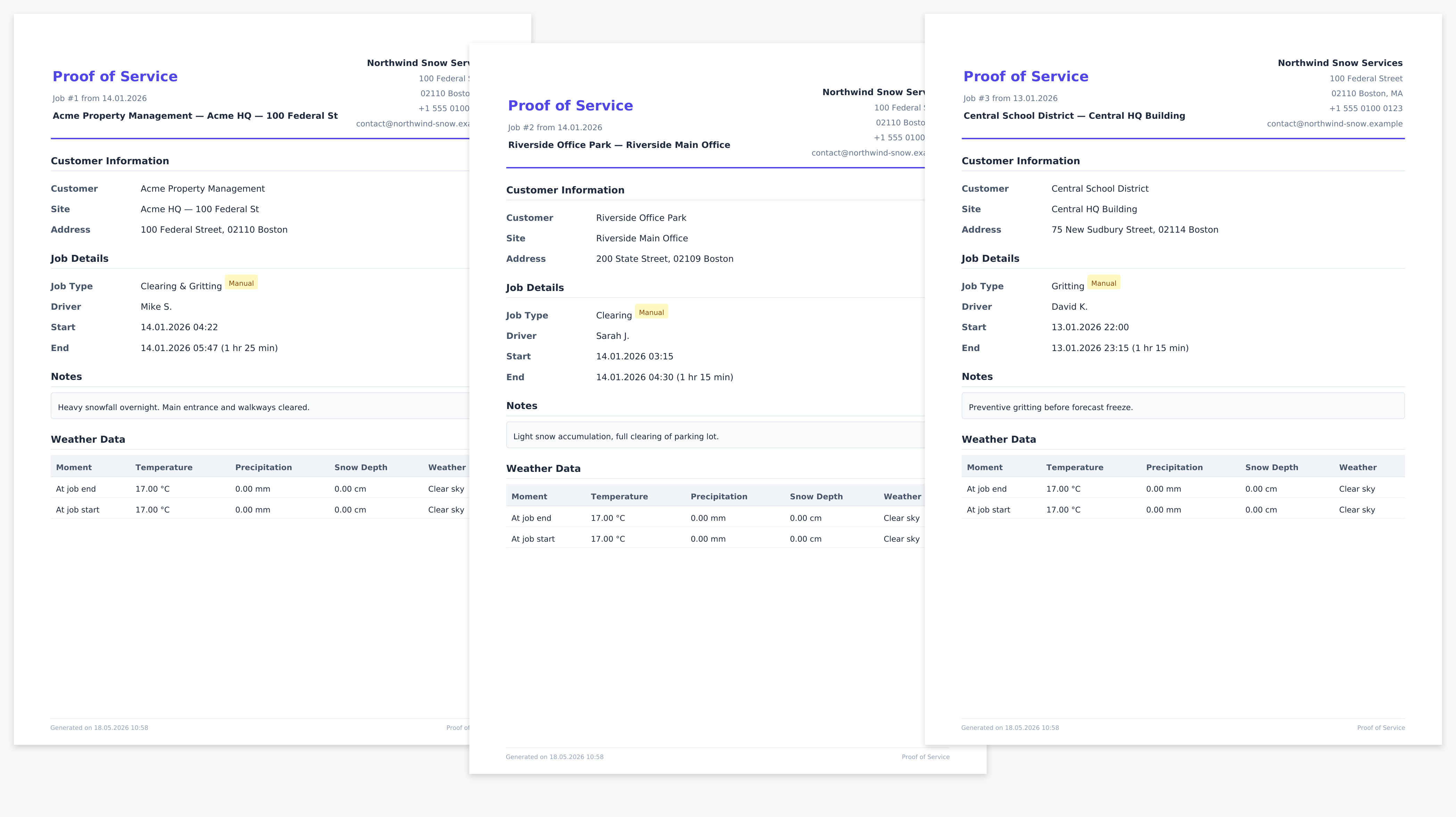
A contractor knows the call. A property manager forwards a complaint from a tenant who slipped near the entrance at 06:40. The question arrives several hours later: were you here? when? with what?
The strength of the answer is the strength of the documentation behind it. A printed route plan does not say what was actually done on the morning in question. A handwritten log depends on the person who wrote it. A text message after the fact is the weakest version of all three. What helps is a record made at the time the work happened, captured by a device the operator did not have to trust.
Service proof, in the contracting sense, is exactly that record: structured, contemporaneous, hard to confuse with an after-the-fact reconstruction.
These are the elements that recur across insurer questionnaires, contract attachments, and the documentation requirements published by professional associations. No single one of them is universally mandated; the combination is what gives a record weight.
When the operator reached the site, when they left. Stamped from the phone clock at the moment the operation opens and closes.
A GPS track from the driver phone, drawn as a vector path inside the PDF. Coverage of the property is visible, not asserted.
Temperature, precipitation, and snow depth captured from an independent provider — Open-Meteo by default, country-specific options available.
A field for the operator to record salt, brine, mechanical clearing, or any combination, recorded at operation close.
Optional photos taken inside the application carry their capture timestamp and GPS fix as metadata.
The driver account is recorded against the operation, along with the shift it sits inside.
The PDF is generated from the locked operation row. Each section comes from a specific part of the database; nothing is composed freehand. Regenerating the PDF later produces the same content, because the source data is closed.
Header block
Operator company name, logo, contact line. The PDF carries the contractor brand, not the software brand.
Operation summary
Customer, site address, operation type, time window, driver, and shift reference.
Weather record
Temperature, precipitation, snow depth at operation start and end, with provider name and the capture timestamp.
GPS track
Vector path drawn from the OwnTracks fixes. Background tiles or a plain backdrop, configurable per installation.
Notes and applications
Free-text driver notes plus the structured application record (e.g. de-icing, mechanical).
Photographs
Optional photos with their capture timestamps and per-photo GPS fixes.
Audit footer
Operation ID, generation timestamp, application version, and a checksum that ties the PDF to the operation row.
The audit footer at the bottom of the PDF carries the operation ID, the generation timestamp, the application version, and a checksum tied to the underlying database row. A reviewer who has a copy of the PDF and access to the Wintertrace installation can verify that the two match.
What this is not: a cryptographic seal that proves the PDF was never altered outside the system. PDFs can be edited by anyone with a PDF editor. What the footer protects is the link back to the operation in the database, which is the part that is locked.
Combined with the audit log — which records who opened, who closed, and who exported each operation — the footer makes after-the-fact changes visible.
It is a structured record of what was captured during the operation. Whether any particular court, insurer, or regulator accepts it as proof depends on the jurisdiction, the contract, and the facts of the case. Wintertrace provides documentation support — it is not a substitute for legal advice.
The PDF itself is a file the operator can store or share. What makes it useful is the database row behind it: the operation, GPS fixes, weather record, and photos are locked once the operation closes, and the audit log records every state change. A regenerated PDF references the same locked row.
A Wintertrace operation contains an independent weather record from a third-party provider, a GPS track from the driver phone, optional photos, and a closed audit trail. The operator presents these alongside the contract. The strength of the resulting case is for the operator and their adviser to assess.
Yes. The header block uses the operator company name and logo. The Wintertrace brand is not visible to the end customer.
Yes. The customer portal lets clients view their operations, the weather record, and (optionally) the GPS track. Each operation is available for download as the same PDF the operator sees.
Retention is configurable. The data protection tools let operators set retention periods per data type and anonymise records past their retention window — see the data protection feature page for the details.
The operation can still be closed and a PDF generated. The absence of a track is recorded honestly — there is no fabricated coverage, and the audit log shows that no fixes were received.
Important: Wintertrace provides documentation support for winter service operations. The PDF service proof is a structured record of what was captured at the time. It is not a legal opinion, not a court-ready certificate, and not a substitute for legal advice. Whether a Wintertrace record satisfies any particular jurisdiction, insurer, or contract is for the operator and their adviser to determine.
Source code on GitHub. Free under GNU AGPLv3.
Upload one small file to your web hosting, open it in your browser, and the installer puts the latest signed Wintertrace core on your webspace. About ten minutes — no FTP client needed.
install.php · Ed25519-signed core · GNU AGPLv3
Read the installation guide →Wintertrace is early and shaped by real winter service work. Share your feedback →