Wintertrace On GitHub →

Winter service app

The "winter service app" is two parts, both open source

Wintertrace is a winter service app in two halves. The driver carries OwnTracks — a free, mature, open-source GPS app — plus the Wintertrace web app in their phone browser. The operator runs the same web app from a laptop or desktop. There is no proprietary native app to download, and no App Store between you and your software.

"Where is the app for my drivers?"

Operators evaluating winter service software ask this question almost first. The expected answer is a brand-named native app in the App Store. The honest Wintertrace answer is different, and worth explaining before the install: there is no proprietary native app, and that is a deliberate choice.

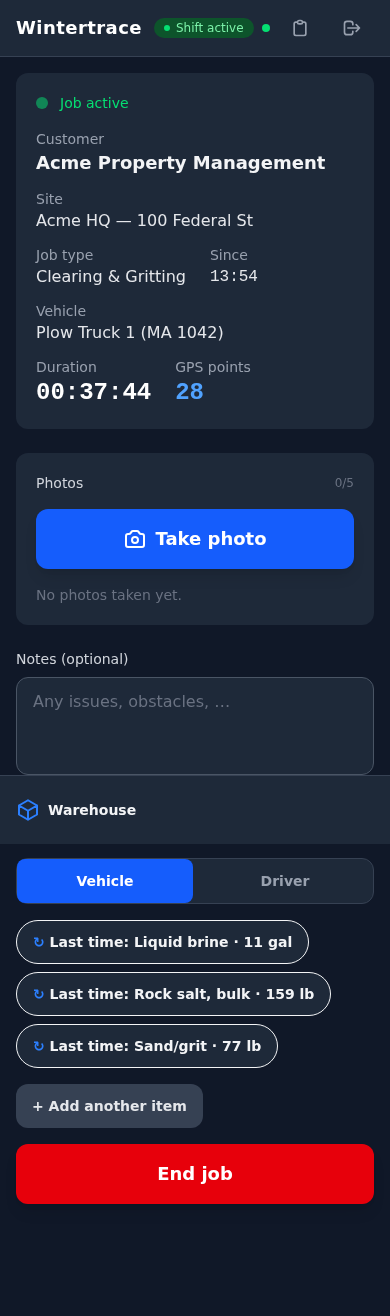
The driver's actual GPS-reporting work is handled by OwnTracks, a dedicated open-source location app that has been doing exactly that job for years. Everything else — opening operations, adding photos, closing operations — happens in the Wintertrace web app, which the driver uses from their phone browser. The same web app, on a desktop, is what the office sees.

The two apps in detail

Driver side

OwnTracks on the driver phone

A free, open-source mobile app for iOS and Android. The driver installs it once, scans a QR code from the admin web app, and is set up. From then on it runs in the background and sends GPS fixes to the Wintertrace installation while a shift is open.
Operator and admin side

Wintertrace web app on the operator hosting

The full admin experience — customers, sites, operations, PDFs, audit log, settings — runs in any modern browser. Drivers use the same web app to open and close operations from their phone. No separate "driver app" to download.

A driver shift, end to end

Six steps. None of them require a native app.

  1. 1

    Open the web app on your phone

    A standard mobile browser. The driver logs in once and stays signed in.

  2. 2

    Start the shift

    A single tap. OwnTracks starts reporting position fixes in the background.

  3. 3

    Open an operation

    Pick the customer and site from the list. GPS fixes from this moment forward attach to the operation.

  4. 4

    Add photos or notes (optional)

    Through the web app interface. Each photo carries its timestamp and GPS fix.

  5. 5

    Close the operation

    Record what was applied or cleared. Weather data fetches automatically. The PDF is ready.

  6. 6

    End the shift

    OwnTracks stops reporting. Shift totals attach to the driver record.

Why no native Wintertrace app exists

Four structural reasons. None of them are about being lazy — each is a choice that lets the project stay focused.

Two apps to maintain instead of one

A native iOS and Android app would double the engineering surface — two release pipelines, two app store approval cycles, two crash reporters. Wintertrace stays a small project on purpose.

No app store gatekeeping

The web app updates the moment we deploy. Driver phones get the latest version on the next page load. No "your driver is still on version 2.4 because the App Store reviewer is on holiday" situation.

Phones already have a good browser

Modern mobile browsers handle camera access, GPS, and offline-tolerant flows. The job Wintertrace does on the driver side does not need anything native.

OwnTracks already exists, is mature, and is auditable

A purpose-built location app that runs reliably in the background is a hard thing to build well. OwnTracks has been doing it for years, is open source, and is maintained by a team focused on exactly that problem.

Questions about the app

Is there a Wintertrace app in the App Store?

No, and that is intentional. The driver-side experience is a mobile-optimised web app accessed through the phone browser. The GPS reporting is handled by OwnTracks, which is in both app stores as a free, open-source application.

Do drivers need to install something?

Yes — OwnTracks, once. The setup is a QR code scanned from the Wintertrace admin area. After that the driver uses the Wintertrace web app from their phone browser.

Will the web app work offline?

Briefly, for short connectivity gaps. OwnTracks itself queues GPS fixes locally when the network is unavailable and uploads them when connectivity returns. The web-app side requires a connection for opening and closing operations.

What if the driver phone changes?

OwnTracks is reinstalled on the new phone and the existing QR code is scanned again. The driver record on the admin side does not change. No re-onboarding from scratch.

Does Wintertrace use my phone battery aggressively?

OwnTracks is built to be a background-friendly GPS app. Battery use during a shift depends on phone model and GPS conditions, but it is the kind of background load that does not flatten a phone within a shift.

Can I use a tablet instead of a phone?

Yes, for the web-app side. For GPS recording, OwnTracks works on iOS and Android tablets with GPS support, but a phone is the practical choice — it is what the driver carries anyway.

Is the source for the mobile-side app open?

OwnTracks is open source, published on GitHub under its own licence. The Wintertrace server side is open source under GNU AGPLv3. Both parts can be audited end to end.

Try Wintertrace.

Upload one small file to your web hosting, open it in your browser, and the installer puts the latest signed Wintertrace core on your webspace. About ten minutes — no FTP client needed.

install.php · Ed25519-signed core · GNU AGPLv3

Read the installation guide →