Documentation software for winter service
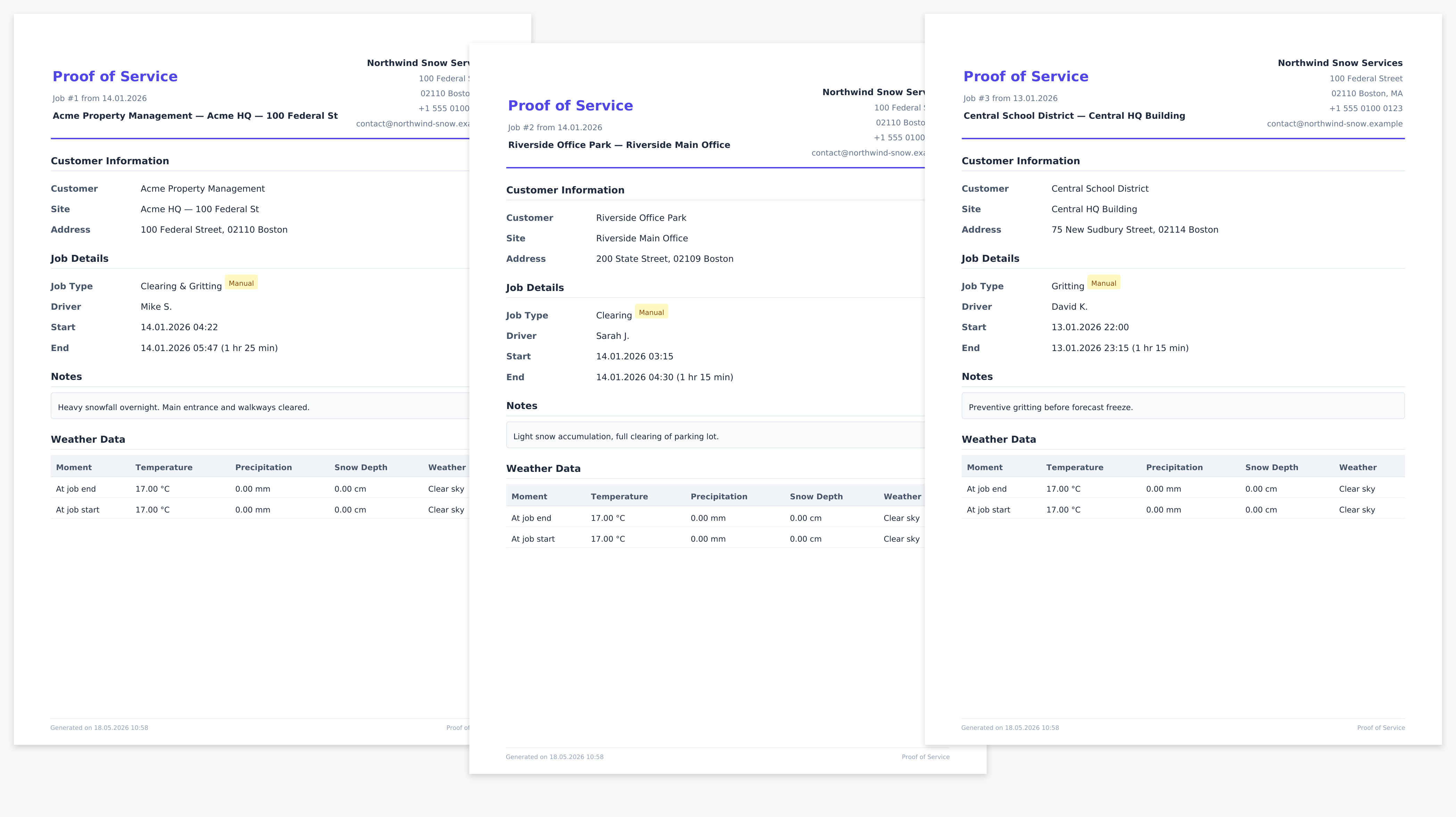
Wintertrace records what was done, where, when, and under which weather conditions. It produces a structured PDF for each operation that an operator can hand to a customer, an insurer, or themselves later.
Snow removal software
Wintertrace is open-source, self-hosted software for documenting snow removal operations. It captures GPS tracks, weather data, and photos for every job, and produces a structured PDF service proof the operator can hand to a customer or an insurer. No subscription, no proprietary hardware, no vendor cloud.
A snow removal operator carries an unusual amount of liability relative to the price of the job. A slip on an icy walkway can trigger a claim that dwarfs a season of revenue from that property. When the claim arrives, the operator has the burden of showing that service was performed at the right time, in the right way, and under the conditions that justified it.
Most general-purpose tools — spreadsheets, paper logs, generic field-service apps — handle the operational side fine. They tend to break down on the documentation side, which is exactly the part that matters in a dispute. Wintertrace exists to handle that side specifically.
Wintertrace records what was done, where, when, and under which weather conditions. It produces a structured PDF for each operation that an operator can hand to a customer, an insurer, or themselves later.
It runs on the kind of shared hosting that runs a small business website. PHP 8.4, MySQL or MariaDB, a browser installer. No Docker, no command line, no vendor cloud in the middle.
The source code is on GitHub under GNU AGPLv3. No per-vehicle subscription, no seat licence, no premium tier of the core application.
The documentation features are jurisdiction-neutral. Operators in the US, UK, Canada, EU, and Australia use the same software. Country-specific compliance modules are planned but not yet released.
Honest scope is more useful than a feature list that pretends to cover everything. The categories below are deliberate gaps, not oversights.
Wintertrace does not assign trucks to routes, optimise winter service paths, or manage call-out lists. Operators who need dispatch run something else for that part.
Invoicing, customer relationship management, and contract administration live in other tools. Wintertrace exports operation data as CSV so a billing system can consume it.
The software captures structured records. Whether a record satisfies any specific jurisdiction, insurer, or court is a question for the operator and their adviser. Wintertrace provides documentation support — not legal advice.
Wintertrace does not run a cloud version. There is no Wintertrace login, no Wintertrace data centre, no Wintertrace support contract. Operators install and operate the software themselves.
Each link points at a feature page with the implementation details.
GPS tracking via OwnTracks →
Position data from the driver phone, directly to the operator server.
Automatic weather records →
Temperature, precipitation, snow depth from independent providers.
PDF service proof →
One bundled PDF per operation with GPS, weather, and photos.
Customer portal →
Clients see their operations themselves, with optional GPS access.
Data protection tools →
Anonymisation, retention, export — built in, not bolted on.
Signed auto-updates →
Ed25519 signatures protect every update against tampering.
A short list of the operator situations where the trade-offs line up. The comparison pages cover the alternatives in more detail.
You document by hand or in spreadsheets
Wintertrace turns the documentation burden into a structured by-product of operations. The driver does almost nothing different; the records assemble themselves.
You are uneasy about vendor lock-in
Self-hosting and open source remove the two main vectors. There is no vendor that can change terms, raise prices, or shut down your access.
You want to keep customer data on your own infrastructure
Customer addresses, photographs of private property, and driver movement profiles stay on the hosting plan the operator pays for.
All comparisons (spreadsheets, paper, cloud SaaS, industry software) →
The software is free under GNU AGPLv3. The only cost on the operator side is hosting, which for a small operation is a few euros per month on standard shared hosting.
Roughly ten minutes through a browser assistant, plus the standard hosting setup. The installation guide on this site covers it step by step.
No. "Self-hosted" here means a hosting plan you control — typically a shared hosting account, the same kind of plan that runs a small business website. You do not need to own hardware.
It depends on what your cloud product does. If it only handles documentation, then yes. If it also handles dispatch, billing, or routing, you would keep that part and add Wintertrace for documentation, or accept that Wintertrace covers less surface area.
Anonymisation, retention policies, and structured exports are built in. The application does not phone home, does not send analytics, and stores all operator data on the operator hosting. Whether any specific regulation is satisfied is for the operator and their adviser to determine.
The software is in active development. The roadmap and changelog on this site describe what is shipped, what is next, and what is still under construction. Operators considering production use should read both before installing.
Note: Wintertrace provides documentation support for snow removal operations. It does not certify regulatory fit in any specific jurisdiction and is not a substitute for legal advice.
Source code on GitHub. Free under GNU AGPLv3.
Upload one small file to your web hosting, open it in your browser, and the installer puts the latest signed Wintertrace core on your webspace. About ten minutes — no FTP client needed.
install.php · Ed25519-signed core · GNU AGPLv3
Read the installation guide →Wintertrace is early and shaped by real winter service work. Share your feedback →