A login per customer
Each customer of the snow service operator has their own account. They sign in to a dedicated URL on the operator installation and see only their own operations.
Snow service customer portal
Wintertrace ships with a customer-facing portal as part of the core application. Each customer of the snow service operator gets their own login and sees the operations on their sites — with weather records, GPS tracks where allowed, and downloadable PDF service proofs. No per-user fee, no separate product, no extra hosting.
Snow service customers — property managers, condo boards, municipal coordinators — tend to ask the same question on the same kind of morning: "did you come, what did you do, and can you show me?" Three questions, repeated across a season, forwarded to tenants, attached to invoices.
Answering them once, in a place the customer can return to, is a measurable reduction in operator workload. The portal is the place. The structured records behind it are the reason the portal is useful in the first place.
Each customer of the snow service operator has their own account. They sign in to a dedicated URL on the operator installation and see only their own operations.
Every operation at their sites, sorted by date, filterable. The customer can scroll back through the season and see what happened on any given morning.
The same weather record the operator sees, attached to each operation. GPS tracks are visible if the operator has enabled them for that customer — a setting the operator controls, not a global toggle.
The same PDF the operator generates is available for the customer to download from the portal. Branded with the operator company, structured the same way.
The portal can serve customers in multiple languages — useful for property management groups with international portfolios. Configurable per customer.
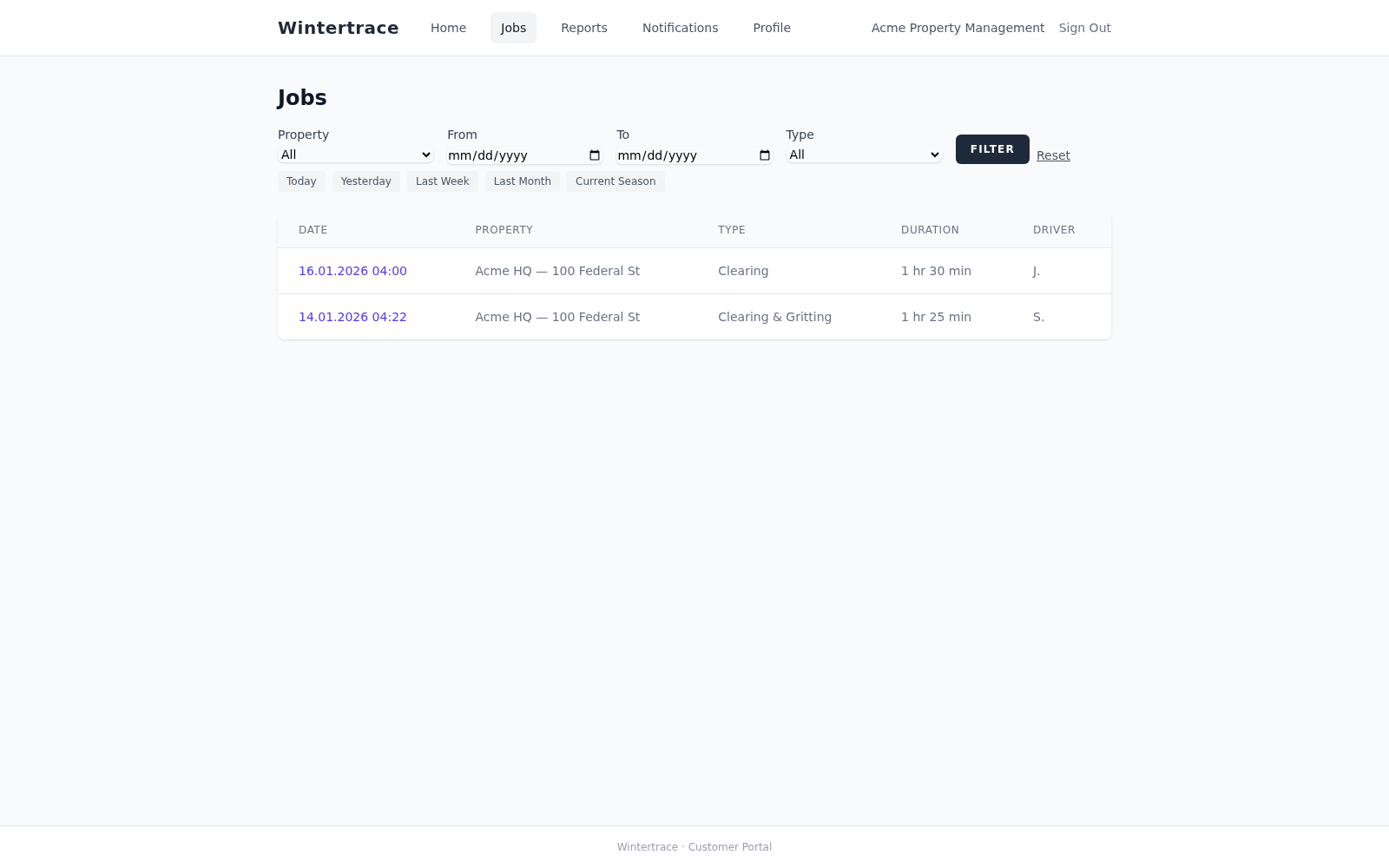
Customers who can see their operations themselves do not call to ask. The reduction in inbound queries is the practical benefit reported most often by operators using customer portals.
The portal is part of the core Wintertrace application. Adding a new customer account is free and unlimited. No per-seat pricing on the customer side.
What each customer sees is configurable. GPS tracks can be shown or hidden per customer. PDF download permissions can be enabled per operation. The operator decides; the customer sees what fits the contract.
Customers see only their own operations. Other customers, the driver list, internal notes, shift records, and analytics views are not accessible from the customer portal.
Four steps in the operator admin area. The whole flow takes a few minutes per customer.
Create the customer record
In the operator admin area. Address, billing details, sites under contract.
Create a portal account
An email address and a generated password sent to the customer. The customer can change it on first login.
Configure visibility
Decide whether GPS tracks are visible, which operations are shown by default, which language the portal serves.
Send the link
A portal URL with login instructions. The customer is ready to use it immediately.
There is no limit imposed by the software. Add as many customer accounts as the operator hosting can handle, which is more than any realistic operator needs.
No. The portal lives on the operator installation, on the operator hosting. There is no Wintertrace cloud involved. Customers access it through a URL on the operator domain.
Customers can add comments where the operator has enabled commenting. They cannot modify operations, weather records, or PDFs. The audit log records any customer-side action with timestamp and account.
Yes. Visibility is configurable per customer. One client might see operations and PDFs but not GPS tracks; another might see everything. Settings sit per customer, not as a global toggle.
The portal carries the operator company name. Logo and colour theming are configurable through the admin area. The Wintertrace brand is not visible to the end customer.
The portal serves only the customer their own data, authenticated by login. The data protection tools in the admin area allow anonymisation and retention policies that the portal respects. Standard practice on the operator side.
Yes. Bulk download of a customer-month produces a PDF stack of every operation for that period. CSV exports of operations are also available where the customer or contract needs them.
Wintertrace covers documentation, not invoicing or contract management. Many operators run a separate billing tool alongside Wintertrace and use the customer portal purely for service documentation. The two do not need to be the same system.
Source code on GitHub. Free under GNU AGPLv3.
Upload one small file to your web hosting, open it in your browser, and the installer puts the latest signed Wintertrace core on your webspace. About ten minutes — no FTP client needed.
install.php · Ed25519-signed core · GNU AGPLv3
Read the installation guide →Wintertrace is early and shaped by real winter service work. Share your feedback →